How to Calculate Instagram Engagement Rate: Formula, Examples & Tips
Instagram engagement rate is one of the most useful metrics for understanding how people interact with your content. Whether you are an influencer, content creator, business owner or digital marketer in India, tracking engagement helps you understand whether your Instagram posts are connecting with your audience.
But how do you calculate Instagram engagement rate? Is it based on followers, likes, comments, shares or saves?
The answer depends on the calculation method you use. In this guide, you will learn how to calculate Instagram engagement rate using simple formulas, practical examples and different Instagram metrics. You will also discover ways to improve engagement and explore how an Instagram SMM Panel fits into a broader social media marketing strategy.
What Is Instagram Engagement Rate?
Instagram engagement rate is the percentage of people interacting with your Instagram content compared with a selected audience or performance metric, such as your total followers or content reach.
Engagement generally includes:
- Likes
- Comments
- Shares
- Saves
- Other available content interactions
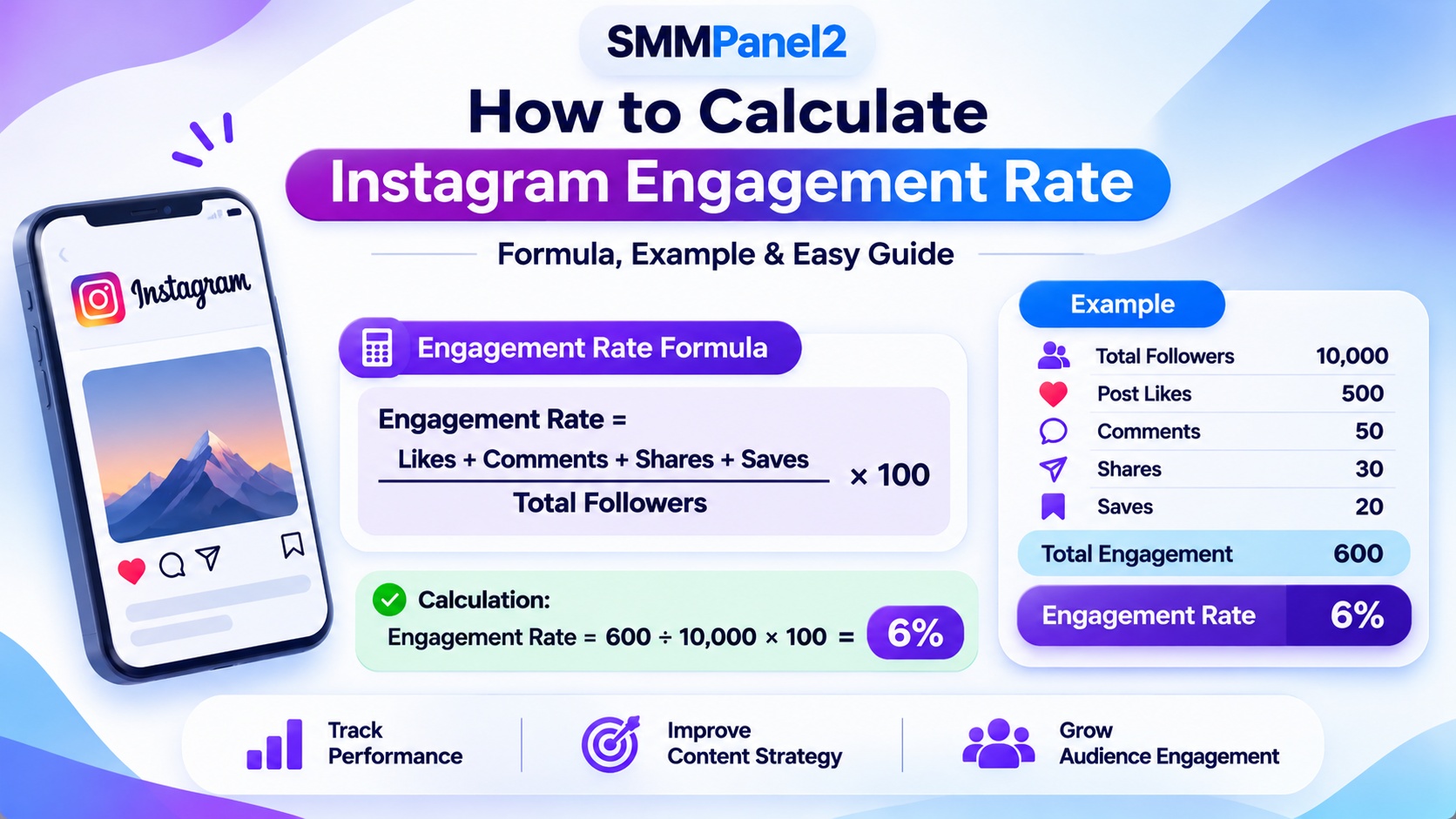
For example, imagine your Instagram account has 10,000 followers and one post receives 500 likes, 50 comments, 30 shares and 20 saves. These interactions can be used to calculate the post's engagement rate.
Engagement rate helps creators and businesses understand more than just their follower count. It provides an indication of how actively people interact with their content.
How to Calculate Instagram Engagement Rate
There are different ways to calculate Instagram engagement rate. The most suitable formula depends on whether you want to measure engagement against followers, reach or impressions.
1. Instagram Engagement Rate by Followers
This is a commonly used method for estimating engagement relative to an account's follower count.
Instagram Engagement Rate Formula:
Engagement Rate = (Likes + Comments + Shares + Saves) ÷ Total Followers × 100
Example:
Suppose an Instagram account has:
- Total followers: 10,000
- Likes: 500
- Comments: 50
- Shares: 30
- Saves: 20
Total engagement = 500 + 50 + 30 + 20 = 600
Engagement rate = (600 ÷ 10,000) × 100
Result: 6%
This means the selected post generated interactions equal to 6% of the account's follower count.
Remember that this is a post-level calculation. For a more representative account-level result, calculate the engagement rate across several posts rather than relying on one post.
2. Instagram Engagement Rate by Reach
Engagement rate by reach measures interactions compared with the number of unique accounts that viewed your content.
Formula:
Engagement Rate by Reach = Total Engagements ÷ Total Reach × 100
For example:
- Total engagements: 600
- Accounts reached: 8,000
Engagement rate by reach = (600 ÷ 8,000) × 100
Result: 7.5%
This calculation is useful when you want to understand how effectively your content engages the people who actually saw it.
3. Instagram Engagement Rate by Impressions
Impressions represent the number of times content was displayed. Unlike reach, impressions can include multiple views from the same account.
Formula:
Engagement Rate by Impressions = Total Engagements ÷ Total Impressions × 100
For example:
- Total engagements: 600
- Impressions: 12,000
Engagement rate by impressions = (600 ÷ 12,000) × 100
Result: 5%
Use this method when you want to compare interactions with the total number of content displays.
Instagram Engagement Rate Calculation Example
Here is another simple example to help you understand the calculation.The calculation is:
(500 + 50 + 30 + 20) ÷ 10,000 × 100 = 6%
To calculate the Instagram engagement rate, divide the total engagement (600) by the total followers (10,000) and multiply the result by 100.
Engagement Rate = (600 ÷ 10,000) × 100 = 6%
You can use the same method for different posts to compare their performance.
What Is a Good Engagement Rate on Instagram?
A good engagement rate on Instagram depends on several factors, including account size, audience quality, industry, content format and posting frequency.
There is no single engagement rate that guarantees success for every Instagram account.
When evaluating your performance, consider:
- Your previous engagement rate.
- The average performance of your recent posts.
- The type of content you publish.
- Your audience's interests and activity.
- The number of people reached by your content.
Instagram Engagement Rate for Small Accounts
Smaller accounts may receive a higher percentage of interactions because their audiences can be more closely connected to the creator.
However, a high percentage does not automatically mean an account has a large or commercially valuable audience.
Instagram Engagement Rate for Medium Accounts
Medium-sized accounts should compare engagement across multiple posts and content formats. This helps identify which topics and creative styles generate more meaningful interactions.
Instagram Engagement Rate for Large Accounts
Large accounts may have a different engagement pattern because their audiences are more diverse. Comparing performance with similar accounts can provide more useful insights than applying one general benchmark.
What Is a Good Engagement Rate for Instagram Influencers in India?
For Indian influencers, engagement can vary by niche, language, location, audience demographics and content format.
For example, a regional creator producing Hindi content may attract a different audience response from an English-language technology influencer. Therefore, compare accounts within similar niches and evaluate engagement quality rather than focusing only on percentages.
How to Check Instagram Engagement Rate?
You can calculate Instagram engagement rate manually or use the insights available through your Instagram account.
Check Engagement Through Instagram Insights
If you have access to Instagram Insights, review the performance metrics available for your posts, Reels and Stories.
Depending on the content and account features, you may be able to review:
- Accounts reached.
- Views and impressions where available.
- Likes and comments.
- Shares and saves.
- Other available interactions.
Use these figures to calculate engagement based on the formula that matches your objective.
Calculate Engagement Rate Manually
To calculate engagement manually:
- Open the Instagram post you want to analyse.
- Record its likes and comments.
- Check available shares and saves through Insights.
- Note your total follower count or content reach.
- Add the interactions together.
- Divide the total by your selected audience metric.
- Multiply the result by 100.
Use an Instagram Engagement Rate Calculator
An Instagram engagement rate calculator can make the calculation quicker.
You generally need to enter the relevant engagement figures and your follower count or reach. The calculator then applies the selected formula and displays the result as a percentage.
Always check which formula a calculator uses because follower-based and reach-based engagement rates are not directly interchangeable.
Instagram Engagement Rate for Reels, Posts and Stories
Different Instagram content formats generate different types of interactions. Measuring each format separately can help you understand what your audience prefers.
How to Calculate Instagram Reel Engagement Rate
For Instagram Reels, consider the available interactions, including likes, comments, shares and saves.
You can calculate Reel engagement using:
Reel Engagement Rate = Total Reel Engagements ÷ Total Reach × 100
You can also use follower count as the denominator when you want to compare performance against your account size.
How to Calculate Instagram Post Engagement Rate
For a standard Instagram post, add the available likes, comments, shares and saves.
Then divide the total by your follower count or the post's reach, depending on your reporting method.
How to Measure Instagram Story Engagement
Instagram Stories have different interaction options, such as replies and sticker interactions.
Review the available Story Insights and choose relevant interaction metrics for your analysis. Do not automatically apply a feed-post formula to Stories without considering the differences in their available metrics.
Which Instagram Content Format Gets Better Engagement?
There is no universal answer. Reels, feed posts and Stories serve different purposes.
- Reels can help introduce content to new audiences.
- Feed posts can encourage likes, comments and saves.
- Stories can support ongoing interaction with existing followers.
Compare each format separately to identify what works best for your audience.
Why Is Your Instagram Engagement Rate Low?
If your Instagram engagement rate is decreasing, several factors may be responsible.
Inactive or Irrelevant Followers
A large follower count does not guarantee that people will interact with your posts. If your audience is not interested in your content, engagement may remain low.
Inconsistent Posting
Irregular publishing can make it difficult to maintain a consistent relationship with your audience.
Low-Quality or Uninteresting Content
Content that does not answer audience questions, provide value or capture attention may receive fewer interactions.
Weak Captions and Calls to Action
Captions that do not encourage discussion or offer a clear reason to interact may limit comments and other engagement.
Poor Audience Targeting
If your content reaches people who are not interested in your niche, they may be less likely to interact.
Lack of Interaction
Responding to comments and engaging with relevant accounts can help build stronger relationships with your audience.
How to Increase Instagram Engagement Rate Organically
Improving engagement requires consistent content, audience understanding and regular performance analysis.
1. Publish High-Quality and Relevant Content
Create content that matches your audience's interests. Focus on useful information, original ideas, relatable experiences and clear visuals.
2. Create Engaging Instagram Reels
Use relevant topics, clear storytelling and strong openings to encourage people to watch and interact with your Reels.
3. Write Captions That Encourage Comments
Ask relevant questions and invite people to share their experiences. Avoid unrelated or repetitive engagement requests.
4. Use Relevant Hashtags
Choose hashtags that accurately describe your content and niche. Avoid using irrelevant hashtags simply to increase visibility.
5. Post When Your Audience Is Active
Review your Instagram Insights to understand when your followers are active. Test different posting times and compare the results.
6. Encourage Shares and Saves
Publish useful tips, checklists, tutorials and informative posts that people may want to save or share.
7. Reply to Comments and Messages
Responding to genuine interactions helps maintain conversations and build a stronger community.
8. Analyse Instagram Insights Regularly
Track your engagement rate over time. Compare recent posts and identify which content formats, topics and publishing schedules produce better results.
Can an Instagram SMM Panel Help Improve Engagement?
An Instagram SMM Panel is an online platform where users can explore social media marketing services through a single dashboard.
An SMM Panel for Instagram may list different service categories, such as:
- Instagram followers.
- Instagram likes.
- Instagram Reel views.
- Instagram Story views.
- Instagram comments.
- Instagram shares and other available services.
These services are different from organic audience engagement. Purchased interactions do not automatically represent genuine interest, improve conversions or guarantee better Instagram reach.
Before selecting any service, review its description, delivery conditions, refill policy and applicable platform requirements. Avoid sharing your Instagram password with third-party service providers.
If you want to understand how these platforms operate, read our guide: How an SMM Panel Works.
How to Choose the Best SMM Panel for Instagram in India?
If you are comparing an Instagram SMM Panel in India, consider more than just the displayed price.
Here are some important points to check:
- Transparent pricing: Review the available service price and minimum order quantity.
- Service details: Understand what each service includes before placing an order.
- Delivery information: Check the stated delivery speed and order requirements.
- Refill policy: Understand whether a refill is available and the conditions attached to it.
- Order tracking: Look for clear order status and tracking information.
- Customer support: Check the available support channels.
- Payment options: Review the payment methods supported by the platform.
You can explore the available options on the SMMPanel2 Instagram SMM Panel .
Explore Instagram Services at SMMPanel2
SMMPanel2 is an online social media marketing platform where users can explore available services for Instagram and other social media platforms.
Whether you are a content creator, influencer, agency or business owner in India, you can review the available Instagram service categories and compare their requirements before selecting an option.
Explore these resources:
- SMMPanel2 Home – Social Media Services
- Instagram SMM Panel – Available Instagram Services
- Browse All SMM Services
- How an SMM Panel Works
- What Does Refill Mean in an SMM Panel?
- What Does Partial Order Mean in an SMM Panel?
Check the latest service descriptions, pricing and policies directly on the platform because availability and conditions can change.
Frequently Asked Questions
Q1. How do you calculate Instagram engagement rate?
Add the relevant interactions, such as likes, comments, shares and saves. Divide the total by your follower count or content reach, then multiply by 100.
Q2. What is a good engagement rate on Instagram?
A good engagement rate depends on account size, niche, audience quality and content format. Compare your results with similar accounts and your own previous performance.
Q3. Is a 5% engagement rate good on Instagram?
A 5% engagement rate can be a positive result in some situations, but its meaning depends on the calculation method, audience size and industry.
Q4. How do I calculate Instagram engagement rate by followers?
Use this formula:
(Likes + Comments + Shares + Saves) ÷ Total Followers × 100.
Q5. Does Instagram engagement rate include saves and shares?
Yes. Saves and shares can be included when calculating engagement, provided those metrics are available for the content being analysed.
Q6. How can I calculate Instagram Reel engagement rate?
Add the relevant Reel interactions and divide the total by Reel reach. Multiply the result by 100 to get the engagement rate by reach.
Q7. Why is my Instagram engagement rate decreasing?
Possible reasons include changes in audience activity, content relevance, posting consistency, reach and the type of content you publish.
Q8. Can I calculate Instagram engagement rate manually?
Yes. You only need the relevant interaction figures and a selected denominator, such as follower count or reach.
Q9. Does a higher follower count mean a better engagement rate?
No. A higher follower count does not automatically mean more interactions. Engagement depends on how actively the audience responds to your content.
Q10. Can an Instagram SMM Panel increase engagement?
An Instagram SMM Panel2 may offer services such as likes, followers, comments and views. However, purchased interactions do not guarantee authentic audience engagement, improved reach or conversions.
Understanding how to calculate Instagram engagement rate helps you evaluate content performance beyond follower numbers. By tracking likes, comments, shares and saves, you can identify which posts connect with your audience and where your Instagram strategy needs improvement.
Use follower-based and reach-based calculations consistently, compare different content formats and focus on building an interested audience.
If you are exploring additional Instagram marketing services, visit SMMPanel2 or check the available options on its Instagram SMM Panel.
About the Author
Shevam – SEO & Digital Marketing Expert
Shevam has over 10 years of experience in SEO and digital marketing. His work focuses on search visibility, digital growth strategies and helping businesses understand how online marketing platforms work.
For more information, visit the SMMPanel2 author profile.